AI Hair Try On & Color Changer
Dream Prayer DeveloperBeauty
4.542.00 Reviews
- Version
- 1.0.19
- Installs
- 50.00K
- Age Rating
- Everyone
Screenshots
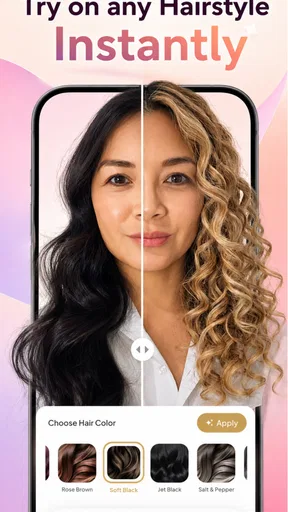
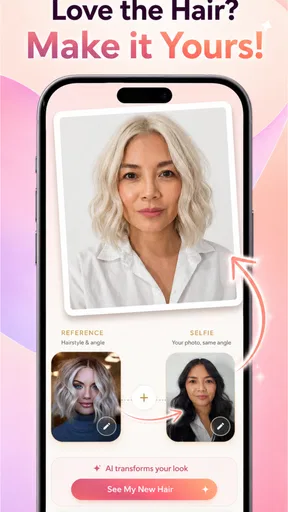
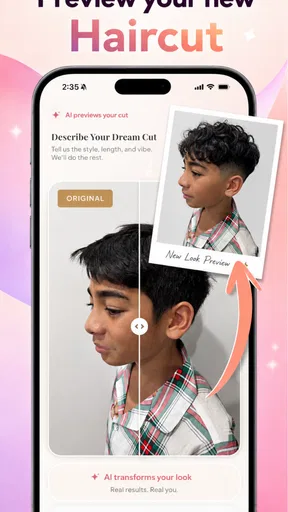
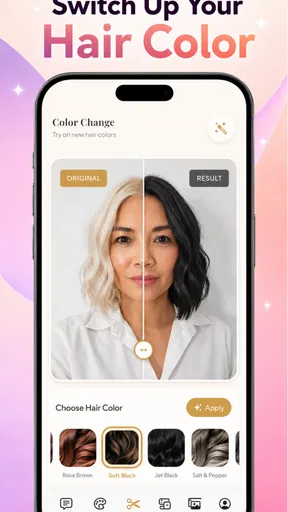
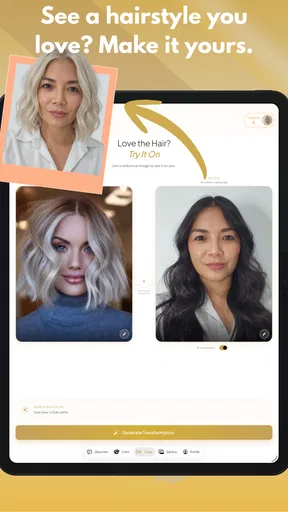
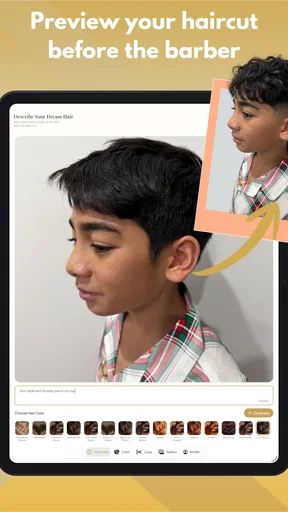
Our Review of AI Hair Try On & Color Changer
 Analysis by Appyee
I tried AI Hair Try On & Color Changer as a quick way to explore a different look before making a real appointment, and my first impression was that it works best as a visual decision aid rather than a replacement for a stylist. The idea is simple: use your own appearance as the starting point, then experiment with hairstyles, hair colours and haircuts without committing to scissors or dye. That makes it especially appealing when I know I want a change but cannot yet describe exactly what I want.
It is a free beauty app from Dream Prayer Developer, with optional in-app purchases ranging from $3.99 to $14.99 per item. The app is rated for Everyone, so it is approachable for casual browsing, family use and anyone who wants a low-pressure way to compare ideas. Its average rating is 4.4 from around 281 ratings, and it has passed 10K+ installs. Those figures suggest a modest but real user base rather than a huge social platform, which matches the focused nature of the experience.
Trying a new look depends on more than the preview
The most useful way to approach this app is to treat each result as a conversation starter. I would not use a generated hairstyle as a promise that my hair will behave exactly that way in real life. Texture, density, length, lighting, face shape and the skill of the person cutting or colouring your hair all affect the final result. Still, seeing several directions on one image can make a vague idea much easier to discuss.
For example, I could compare a shorter cut with a longer style, then look at colour changes separately instead of trying to imagine everything at once. That separation is important. A dramatic haircut may look appealing because of the colour applied to it, while the same cut in a natural shade might be easier to maintain. I found the app more helpful when I used it to isolate one decision at a time.
A realistic everyday scenario would be preparing for a salon visit after work. Rather than scrolling through unrelated photos and wondering whether a style would suit me, I could use a personal image, test a few broad directions and save the most convincing ideas for discussion. The result does not need to be perfect. Its value is in reducing uncertainty before I spend time and money on a change that cannot be instantly reversed.
What the app is good at during early planning
AI Hair Try On & Color Changer is particularly useful for people who hesitate between familiar and adventurous choices. I can begin with a subtle colour adjustment or a small change in length, then move toward something more noticeable if the first option feels too safe. This gradual approach is better than jumping straight into the boldest available idea and judging the whole app by one unrealistic preview.
It can also help when two people are trying to agree on a look. A friend, partner or family member may have a strong opinion about what would suit me, but descriptions such as “soft layers” or “a warmer brown” can mean different things to different people. A visual reference gives everyone something concrete to react to. I would still bring several examples to a professional rather than presenting one image as an exact instruction.
One less obvious use is checking whether a change fits a particular occasion. Before a holiday, interview, celebration or photo session, I can compare a polished shorter style with a more relaxed option. That does not predict how long styling will take, but it encourages a practical question: do I actually want this look every morning, or do I only like it in a special-event setting?
Why connectivity shapes the experience
Because the app is built around AI-assisted visual changes, the experience can feel more dependent on a reliable connection than a simple offline photo editor. The important point is not to assume that every step will behave the same way when the network is weak. When I am testing several looks, interruptions are more noticeable because the process involves waiting, checking a result and deciding whether to try again.
A strong connection makes experimentation feel spontaneous. I can move from a haircut idea to a colour idea without breaking my concentration. On a crowded mobile network, the same process may become stop-and-start, which makes it harder to compare options fairly. A delayed result is also easy to misread: I may think a choice failed when it is still processing, or repeat an action unnecessarily.
My practical advice is to prepare the photo and the shortlist before starting a serious comparison session. If I already know which three or four directions interest me, I spend less time repeatedly sending uncertain requests and more time judging the results. This is a small change in workflow, but it matters on mobile data and when I am using the app away from home.
Using it comfortably on a phone
The app makes most sense in short mobile sessions. I can use it while deciding what to ask for at a salon, show a friend a possible colour during a shopping trip or revisit an idea before booking an appointment. I would not expect it to replace a full desktop image editor, because its purpose is quick appearance exploration rather than detailed retouching or professional compositing.
Phone photography also introduces a trade-off. A clear, front-facing image is easier to judge than a dark photograph with hair partly hidden by a hat, strong shadows or a busy background. This is not merely a cosmetic issue. If the original image makes the hairline, length or surrounding face difficult to read, a preview can become less useful even when the chosen style itself is attractive.
I get better comparisons when I keep the source image consistent. Using the same photo for several colours makes the changes easier to evaluate. Switching between a close-up selfie, a side angle and a heavily filtered portrait may create differences that come from the photos rather than the hairstyles. For an honest decision, I would use one well-lit image first, then use additional angles only to investigate a specific concern.
Another useful mobile habit is to avoid making a final decision while casually scrolling. A style that catches my eye for a few seconds may not suit my usual clothing, work routine or willingness to maintain it. I prefer to return to the strongest candidates later and ask practical questions: can I manage this length, will the colour demand frequent upkeep, and does the change still appeal when viewed beside my normal appearance?
When a preview disappoints or stops behaving as expected
Any AI appearance tool needs a little patience when the input image is complicated. Hair that blends into the background, faces turned sharply away from the camera, overlapping accessories or unusual lighting can make a result feel less convincing. I would not immediately conclude that a hairstyle is wrong. First, I would try a clearer image with the hair visible and the face positioned more naturally.
This is one of the app’s important limitations: a preview can look polished while still simplifying the details that matter in real life. Fine strands, curls, layered edges and colour variation may not translate perfectly. A result that looks good on a small phone screen may reveal awkward transitions when enlarged or compared closely with the original. That is why I see the app as a shortlist generator, not a technical consultation.
Network interruptions create a different kind of friction. If an action appears not to complete, I would avoid tapping repeatedly. Instead, I would pause, check whether the result has appeared and then retry only once I know the previous attempt did not finish. This reduces duplicate attempts and keeps the comparison process organized. If a session becomes unreliable, taking a screenshot of the last useful result and returning later is more sensible than forcing a long sequence on an unstable connection.
It also helps to keep expectations modest when comparing extreme changes. A very short cut, a major colour shift or a style that changes the visible outline of the head asks more from an automated preview than a small adjustment. I would use the bold results for inspiration, then verify the idea with a stylist who can assess hair condition, existing colour and the actual work involved.
Being careful with personal photos
Before using any beauty app with personal images, I think about what I am comfortable uploading or processing. A face photo is more personal than a generic reference picture, so I would choose an image specifically for this purpose rather than selecting one that includes children, friends or private surroundings. Cropping the frame to the person testing the look is a sensible data-conscious habit.
I would also avoid treating the app as a private diary of every appearance experiment. If I am only curious about a colour, there is no need to include a recognizable location, workplace details or other people in the image. A simple, neutral photo keeps the focus on the hair and limits unnecessary personal context.
The free entry point makes it easy to explore, but the optional purchases deserve attention before I move from casual testing to repeated use. I would check the purchase prompt carefully, especially if I am testing many variations or letting someone else use the phone. The presence of paid items does not make the app unsuitable, but it changes how I would recommend it: start with the free experience, decide whether the previews genuinely help, and only then consider spending.
Parents may also appreciate that the content rating is Everyone, but that does not remove the need for ordinary supervision around purchases and personal images. The age label describes the app’s content suitability; it is not a substitute for explaining responsible photo sharing or checking what a child is doing on a shared device.
How it compares with ordinary beauty apps and salon research
Compared with a basic photo editor, this app is more focused on the specific question of “what might I look like with a different hairstyle or colour?” A general editor may offer filters, manual brushes and broad adjustments, but those tools often require more effort and do not naturally guide someone through haircut ideas. If my goal is appearance planning rather than artistic editing, the focused approach is more convenient.
Compared with browsing salon galleries or social media, the personal-photo angle is its clearest advantage. A model or influencer may have a different face shape, hair texture and styling routine. Seeing an idea in relation to my own appearance can expose whether I like the cut itself or merely like how it looks on someone else. On the other hand, real salon photos show texture, movement and maintenance in a way a generated preview may not.
A professional consultation remains the better choice when the decision involves damaged hair, corrective colour, chemical treatment or a major structural change. A stylist can inspect the hair directly, explain what is achievable and estimate the upkeep. This app is better earlier in the process, when I am narrowing the field and need visual confidence before that conversation.
Who should use it, and who should skip it
I would recommend it to someone who regularly changes their mind before a haircut, wants to compare colour families or needs a visual reference for a salon discussion. It is also a good fit for cautious users who want to explore without immediately committing to a permanent change. The free price makes that first experiment easy, while the Everyone rating keeps the app broadly accessible.
I would be more cautious about recommending it to someone seeking exact colour matching, professional-grade hair analysis or a guaranteed preview of a complex cut. People with highly specific technical needs may get more value from a consultation and real reference photos. Likewise, anyone uncomfortable using personal face images with an AI beauty tool should skip it rather than feeling pressured to participate.
The app is less suitable when the decision is urgent and the network is unreliable. If I am already sitting in a salon chair and need an exact answer immediately, a saved reference photo and a conversation with the stylist are safer. The app works best before the appointment, when I have time to retry an image, compare alternatives and think about maintenance.
Version, access and the overall balance
The current version is 1.0.12 and it runs on Android 7.0 or newer, which gives it a useful level of compatibility for people who do not own a recent phone. I would still keep the app updated when possible, particularly for an AI-based experience where processing and interface behavior can change over time. On an older device, I would be patient with image handling and avoid judging the concept solely by a slower handset.
What I like most is the way it turns an uncertain beauty decision into a set of visible options. The strongest workflow is not “generate everything and pick the most dramatic result.” It is: choose a clean photo, test one variable at a time, keep a small shortlist, revisit it later and take the finalists to a stylist. That method produces more useful information and reduces the temptation to chase novelty.
What holds it back is the gap between an appealing preview and real-world hair. Connectivity can interrupt the flow, image quality affects the outcome, and paid items may become relevant for users who want extensive experimentation. None of those issues ruins the experience, but they make the app better for exploration than certainty.
My final view is that AI Hair Try On & Color Changer is worth trying if I want a quick, visual way to think through a hairstyle or colour change. I would use it on a stable connection, with a carefully chosen photo and realistic expectations. Its best result is not a perfect prediction; it is a clearer decision and a better conversation with the person who will actually do the hair. For that purpose, it is a useful beauty companion, while anyone needing precise technical advice should move from the app to a qualified professional before making a permanent change.
Privacy and Permissions
See what permissions an app requests and how it handles your data.
- Photos/Media/Files
- read the contents of your USB storage, modify or delete the contents of your USB storage
- Storage
- read the contents of your USB storage, modify or delete the contents of your USB storage
- Camera
- take pictures and videos
- Other
- view network connections, full network access, control vibration, prevent device from sleeping, Google Play license check, read Google service configuration
Verdict
Strengths of AI Hair Try On & Color Changer
- Lets you preview multiple hair colors before making a real change.
- Useful for comparing subtle shades and bold styles in one place.
- Quick results make it convenient for casual style experimentation.
- Can help users communicate hairstyle ideas to a salon professional.
- Simple concept suitable for users with little photo-editing experience.
Limitations of AI Hair Try On & Color Changer
- Results may look less realistic with poor lighting or blurry photos.
- Some hairstyles or color options may require in-app purchases.
- Facial and hair detection can be inaccurate in side-profile images.
- Virtual previews cannot fully show texture, volume, or maintenance needs.
- Uploading personal photos may raise privacy concerns for some users.
Similar Picks in This Category
View All
Beauty Makeup Editor & Camera
Photo & Video Editors - Instant Solution4.7

Perfect365: Face Makeup Editor
Perfect365, Inc.3.5

Mirror Plus - HD Mirror app
Digitalchemy, LLC4.8

Cute Lock Screen & Wallpapers
Prometheus Interactive LLC4.6

HD Camera for Android
One Music Player4.5

Phone Mirror app - True Mirror
Cards4.6
Frequently Asked Questions
What is AI Hair Try On & Color Changer?
AI Hair Try On & Color Changer is a beauty and hairstyle simulation app that lets you preview different haircuts, hairstyles, and colors using a photo. After uploading or taking a picture, the app applies virtual changes to your appearance so you can compare possible looks before visiting a salon. Results can vary depending on image quality, lighting, and the selected style.
How do I use AI Hair Try On & Color Changer?
To use the app, select a clear portrait from your gallery or take a new photo with the camera. Follow the on-screen instructions to position your face, then choose a hairstyle or hair color from the available options. The AI processes the image and generates a preview. For the most convincing result, use a front-facing photo with good lighting and keep your hair and face clearly visible.
Does the app provide realistic hairstyle and hair-color results?
The app can create useful and entertaining previews, but the results should not be treated as an exact prediction of how a haircut or color will look in real life. AI-generated effects may appear less accurate with curly or covered hair, unusual angles, shadows, or low-resolution photos. Hair texture, thickness, natural color, and the work of a professional stylist can also affect the final real-world appearance.
Is AI Hair Try On & Color Changer free to download and use?
The application may be available to download at no initial cost, but some hairstyles, color options, editing tools, or advanced AI features can require in-app purchases or a subscription. Before confirming a trial or payment, review the pricing details, renewal terms, and cancellation instructions shown in the app store and within the application. Availability of free features may also change after updates.
Are my photos and personal data safe when using the app?
Before uploading personal photos, review the app’s privacy policy and the permissions requested on your Android or iOS device. AI processing may occur on the device or through online servers, depending on the version and feature being used. Avoid uploading sensitive images, check whether photos are stored or shared, and only grant camera or photo-library access when it is necessary for the features you want to use.
